Monster Trucks Game for Kids 2
Raz GamesEducational
4.11.36K Reviews
- Version
- 3.5.4
- Installs
- 100.00M
- Age Rating
- Everyone
Screenshots
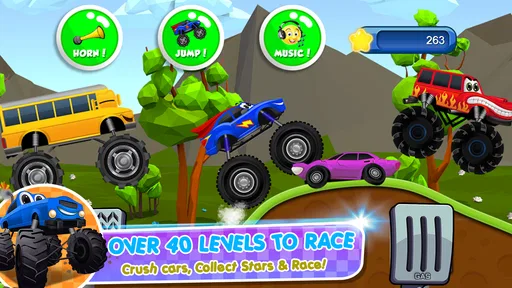
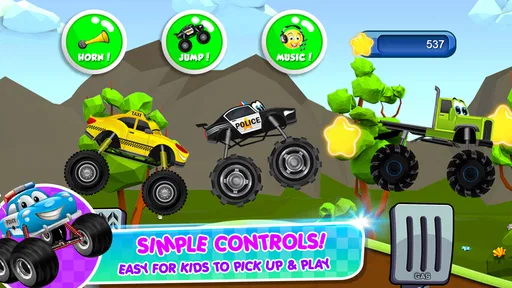
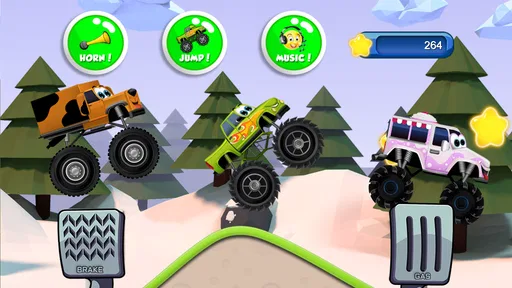
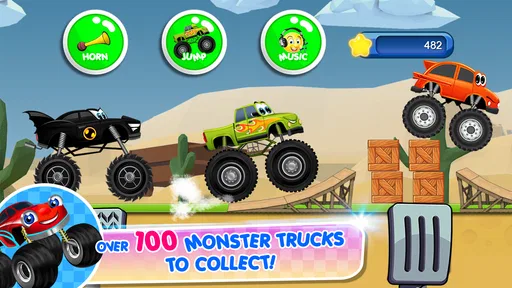
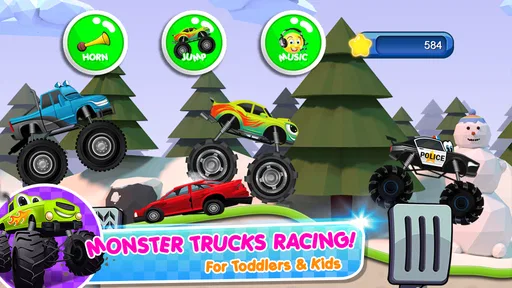
Our Review of Monster Trucks Game for Kids 2
 Analysis by Appyee
What makes this game worth a closer look is its uncomplicated monster-truck play: children choose a vehicle, then use simple taps to move, jump, and flip through obstacle-filled routes. I find that narrow focus more useful than a long feature list. A young child can understand the basic goal quickly, while a parent can see whether the pace and controls suit them before handing over the device for a longer play session.
A simple loop that suits short attention spans
The basic appeal is easy to explain to a child: pick a truck and guide it through a course. That clarity matters when a game is being used for a short wait, a quiet break at home, or a little shared play before bedtime. There is no need to teach a complicated set of rules first. I would still sit with a first-time player for a moment, mainly to show how tapping affects the truck and to see whether they enjoy the movement and sounds.
For a young player, repeating a short action can be satisfying without requiring a grown-up to turn the game into a lesson. They can try a jump, see what happens, and adjust their timing on another attempt. That is where the hand-eye practice feels most tangible: the child is watching the truck approach an obstacle and choosing when to act. It is a modest benefit, not a substitute for a structured learning app, but it gives the play a little more purpose than simply watching a screen.
How I would use it in an everyday routine
Imagine a child waiting while a parent finishes a phone call at home. This can be a handy option for that short stretch because the premise is immediately visible and the controls are approachable. I would set the device up, check that the child is comfortable with the taps, and agree on a stopping point before play starts. That small bit of framing helps keep a quick distraction from turning into an open-ended screen session.
It also works better as a shared activity than its simple controls might suggest. A parent can ask the child which truck they want to try, encourage them to watch for the next obstacle, and let them make the timing decision. That keeps the adult involved without taking over the game. If the child gets frustrated after a difficult maneuver, I would switch from coaching to letting them explore at their own pace; the point is enjoyment, not perfect runs.
Who is likely to enjoy it, and who may not
I can see this working best for toddlers and younger children who like big vehicles, bold cartoon visuals, and quick cause-and-effect play. It is also a reasonable first racing-style game for a child who is still getting used to touchscreen controls. Raz Games makes it for young players, and its Everyone content rating fits the child-friendly positioning. Parents looking for an easy activity rather than a deep challenge are the likeliest audience.
Older children who want detailed vehicle tuning, competitive racing, realistic driving, or a complex progression system may find the straightforward approach too light. Likewise, if your child prefers puzzles, stories, or open-ended creative play, monster trucks may not hold their interest for long. I would choose a more focused educational game when the main goal is practicing a particular school skill, since the learning here comes through timing and coordination rather than formal instruction.
What to consider before installing
The game is free to download, but it includes optional in-app purchases priced from $0.99 to $3.99 per item. I would review purchase settings with a child before they play, especially if they use a device where buying is easy. The simple interface may make independent play possible, but that does not remove the value of an adult checking the device’s purchase controls and setting clear expectations.
It has been available since May 10, 2016, and version 3.5.0 is the current release. Its minimum operating-system requirement is Android 6.0. Those details make it worth checking device compatibility before planning to use it on an older tablet. The game has a 4.1 average from around 103,000 ratings, with roughly 1,400 written reviews and over 100 million installs. Those figures suggest that many families have tried it, but they cannot tell you whether its particular style will suit your child; a short supervised first session is still the best test.
Unleashing the Monsters
Have you ever seen the way kids light up when they see something big and loud? That’s exactly the vibe Monster Trucks Game for Kids 2 delivers. It’s an interactive app designed specifically for children, combining the thrill of monster trucks with safe, age-appropriate gameplay. The game layout is straightforward, ensuring even the youngest players can navigate without a hitch.
Gameplay and Features
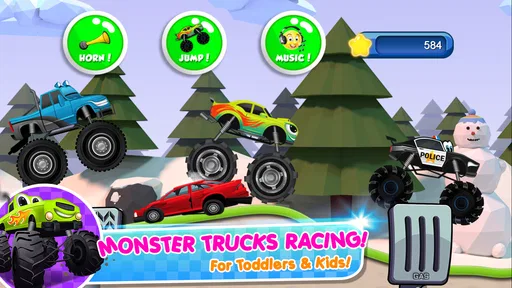
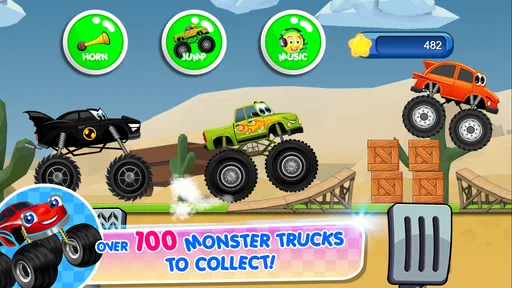
Right off the bat, the app greets you with vibrant colors and easy-to-use controls. The game offers a variety of monster trucks, each with its own unique personality and style. Kids can choose their favorite and embark on a journey through different terrains filled with obstacles, ramps, and challenges.
The controls are intuitive. A simple tap here and there gets the trucks moving, jumping, and flipping. It’s all about having fun without frustrating the young players. The sound effects are a real treat, adding to the excitement with every rev of the engine and crash into barriers.
Graphics and Animation
The graphics are delightfully cartoonish, which is perfect for kids. The animation is smooth, and the trucks bounce and roll with realistic yet exaggerated physics that will have kids giggling. The developers have done a splendid job in making sure everything on screen is engaging and interactive.
Learning Through Play
One of the standout features of this app is its subtle educational aspect. While it’s primarily a game, it encourages problem-solving and hand-eye coordination. Kids learn to anticipate obstacles and time their movements, all while having a blast. It’s learning disguised as play, which is always a win-win for parents and children alike.
Customization and Rewards
Kids love being able to customize their experiences, and this game delivers just that. They can alter their trucks with different colors and designs, making each play session feel fresh and new. Plus, there are rewards to be earned, which keeps them coming back for more. Collecting stars and unlocking new vehicles gives the little ones a sense of achievement.
Safe and Child-Friendly
Safety is always a priority when it comes to children’s apps, and this game gets it right. There are no ads interrupting gameplay, which is a huge relief. The controls are designed to be simple yet effective, ensuring kids can play independently without needing constant help from adults.
How it compares with other children’s games
Compared with racing games aimed at older players, this one places approachability ahead of speed, realism, or competition. That is a meaningful distinction for a child who wants to make a truck move without learning a complicated control scheme. Compared with preschool learning apps, though, its educational value is incidental: it asks for attention and timing rather than teaching letters, numbers, or another defined topic. I would choose it for playful vehicle-themed practice, not as a replacement for a learning activity with a specific objective.
That trade-off is also why it can be easier to share with a younger child than a more demanding racing game. An adult does not have to explain a detailed strategy before the child can take part. But a child who thrives on structured levels, clear lessons, or head-to-head competition may be happier elsewhere. The right alternative depends less on age alone and more on what the child wants to do: make trucks perform lively stunts, or work toward a deeper challenge.
Small ways to make a play session work better
I would start by letting the child choose a truck rather than immediately taking over the controls. That choice gives them a simple way to feel involved before the action begins. Then, instead of telling them when to tap, I would ask what they notice as an obstacle approaches. It turns the game’s timing into a little observation exercise and gives the child room to learn through trying, without making each run feel like a test.
For a child who is still developing touch control, short turns are more useful than expecting a long stretch of independent play from the start. Sit nearby, watch whether the child can make the truck respond, and offer help only when they ask or become stuck. If the sounds or fast movement become overstimulating, pause rather than pushing through. The energetic presentation is part of the fun for some children, but it will not suit every temperament.
Keeping expectations and purchases in perspective
There are a few practical limits to keep in mind. The game’s child-friendly design does not automatically make every device setting child-proof, so I would check purchase controls and supervise early sessions. The optional items cost between $0.99 and $3.99 each; a child may not distinguish a normal game choice from a purchase prompt. Setting that boundary before handing over the device is easier than explaining it mid-play.
I would also treat the truck selection and rewards as reasons to revisit the game, not as proof that it offers endless variety. A child who enjoys collecting and personalizing vehicles may stay interested longer; another may quickly want a new kind of activity. That is a normal difference in taste, and it is one reason I would keep this as one option in a small rotation rather than rely on it as the only screen-time choice.
What parents may still want to know
Is it appropriate for a very young child? Its simple taps and Everyone rating make it approachable, but age alone cannot predict whether a child will manage the controls or enjoy the lively action. I would test it together first. Does it teach a formal subject? No: the useful practice is mainly coordination, attention, and timing, so families seeking lessons should choose a more explicitly educational title. Can a child play without help? The interface is designed to be easy to navigate, though a first-time player may still benefit from an adult showing how the controls respond.
Is it a good fit for a quiet activity? That depends on the child. The cartoon trucks and engine sounds create an energetic mood, so I would not pick it when the goal is calm, low-stimulation play. And is it worth trying if a child already likes racing games? It can be, especially if they want an uncomplicated, younger-child-friendly take on trucks; if they are asking for realistic driving or more involved competition, a different game is likely to hold their attention better.
My final recommendation
Overall, Monster Trucks Game for Kids 2 is a delightful app that combines fun, excitement, and a bit of education in a neat, kid-friendly package. It’s perfect for keeping young ones entertained while they develop essential skills. So, if you’re on the lookout for an engaging game that’s safe and enjoyable for your child, this app is definitely worth considering. Download it today and let the monster truck adventures begin!
Verdict
Strengths of Monster Trucks Game for Kids 2
- Engaging graphics and animations
- Simple controls for young kids
- Variety of trucks to unlock
- Encourages creativity and exploration
- No ads during gameplay
Limitations of Monster Trucks Game for Kids 2
- Limited levels available
- In-app purchases can be pricey
- Repetitive sound effects
- No multiplayer options
- Requires internet for updates
Similar Picks in This Category
View All
Little Panda Policeman
BabyBus4.0

Little Panda's Chinese Recipes
BabyBus4.4

Little Panda's Restaurant
BabyBus4.4

Little Panda's Ice Cream Games
BabyBus4.3

Baby Panda Care
BabyBus3.8

Baby Panda's Supermarket
BabyBus4.6
Frequently Asked Questions
What age group is Monster Trucks Game for Kids 2 suitable for?
Monster Trucks Game for Kids 2 is designed primarily for children aged 2 to 8 years old. The game features simple controls and vibrant graphics that are easy for young kids to use. It encourages hand-eye coordination and problem-solving skills in a fun and engaging way, making it ideal for early childhood development.
Does Monster Trucks Game for Kids 2 offer in-app purchases?
Yes, Monster Trucks Game for Kids 2 includes in-app purchases. While the core game is free to download, there are additional features and vehicles available for purchase. Parents should be aware of this to manage spending and can use parental controls to prevent accidental purchases by their children.
Can Monster Trucks Game for Kids 2 be played offline?
Yes, Monster Trucks Game for Kids 2 can be played offline. This makes it a great option for entertainment during car rides or in areas with limited internet access. However, some features like updates or certain in-app purchases may require an internet connection.
Is the game available on both Android and iOS platforms?
Monster Trucks Game for Kids 2 is available on both Android and iOS platforms. Parents can download the game from the Google Play Store for Android devices or the Apple App Store for iOS devices, ensuring compatibility with a wide range of smartphones and tablets.
Are there any ads in Monster Trucks Game for Kids 2?
The game does contain advertisements, which help support the free version. However, these ads are designed to be child-friendly. Parents have the option to purchase an ad-free version to provide an uninterrupted experience for their children, ensuring they can play without distractions.
Play our best games!


